Онлайн-сервис для покупки и продажи доменых имен.
Що потрібно для того, щоб виставити домен на торги?
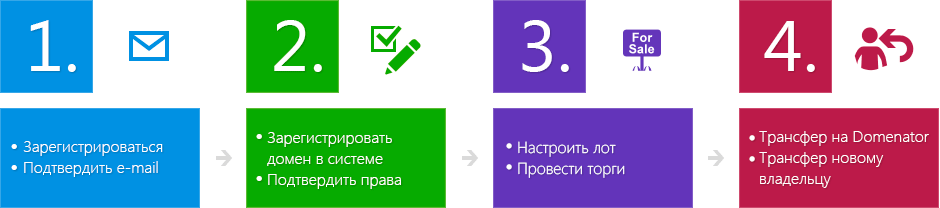
Після реєстрації на Вашу електронну адресу прийде лист з посиланням для підтверження email. Зверніть увагу що у деяких випадках наш лист може попасти у папку зі спамом.
Ми рекомендуємо Вам внести наш email до списку довірених отримувачів.
Після того як Ви добавили домен Ви повинні вказати два ключових слова по яким його буде легко знайти і також обовязково вибрати як мінімум одну категорію до якої відноситься домен. Також ми рекомендуєм максимально точно вказати наступну інформацію на 4-му кроці реєстрації домена: Додаткові ключові слова (теги). До 10 слів через кому або з нового рядка. Також подібні сайти(домени) своїх конкурентів або просто назви подібних сайтів. Кожен сайт(домен) у новому рядку. Також короткий опис домена до 250 символів. Ми рекомендуєм надати максимально повну інформацію що допоможе Вам швидше знайти свого покупця.
Після реєстрації домена у системі Вам буде запропоновано два варіанта підтвердження права власності на домен -потрібно буде або добавити CNAME-запис або добавити піддомен до зареєстрованого Вами домену у панелі управління вашого реєстратора. Таким чином Ви зможете підтвердити домен у нашій системі після чого зможете виставити домен на продаж.
На данний час продаж доменів пожливий двома способами: 1. Виставити домен на продаж зі стартовою ціною не нижче від 50 у.о. з можливістю вказати ціну “Buy Now” (конкретну фіксовану ціну за котру Ви готові продати домен без торгу).Зацікавлені покупці будуть пропонувати Вам свої ставки і Ви можете погодитися на ту ціну що вважаєте за потрібне.
Звертаємо Вашу увагу на те що якщо Ви погодилися на ставку але пізніше відмовились то повторно виставити домен на продаж Ви зможете лише через 60 днів. Ми слідкуємо за тим щоб торгівля доменами велась чесно. 2. Другий варіант це продати домен по фіксованій ціні “Buy It Now” . Ця вартість не може бути нижчою від 50 у.о.
Комісія нашого сервісу складає 5 у.о.+10% від сумми продажу домена. Для продавців що активно використовують наш сервіс ми розробили зручну систему знижок. Комісія банку або webmoney сплачується продавцем додатково.Гроші приймаються та виплачуються у гривнях на карту Приват Банку по курсу на день виплати.
Під час продажу домена Вам буде необхідно здійснити трансфер Вашого домена на DNmarket. Вам потрібно буде ініціювати трансфер і ми підкажемо Вам усі подальші необхідні кроки. Вам буде потрібно підтвердити згоду на трансфер у вашого регістратора. Також можливо виконати трансфер до DNmarket під час регістрації та вводу домена у систему DNmarket- це прискорить продаж домена так як покупець буде бачити що трансфер вже виконано.
Після того як продавець здійснив трансфер домена на DNmarket а покупець оплатив покупку, DNmarket автоматично здійснить безпечну для обох сторін передачу домена від продавця до покупця. Зверніть увагу що певний час (до 2-х місяців) у реєстрі можуть зберігатися контактні данні попереднього власника. Це пов`язано з правилами доменних зон.
Система автоматично змінить запис згідно до регламенту доменної зони.
Як купити домен на DNmarket?
Після реєстрації на Вашу електронну адресу прийде лист з посиланням для підтверження email. Зверніть увагу що у деяких випадках наш лист може попасти у папку зі спамом. Ми рекомендуємо Вам внести наш email до списку довірених отримувачів.
На сторінці з результатами пошуку у відповідь на Ваш пошуковий запит Ви отримаєте відповідності розділені на три групи: 1. У першій групі показані результати пошуку по популярним доменним зонам-ці домени або доступні для реєстрації в загальному порядку або, як правило,вже зайняті. Ви побачите статус домена і зможете перейти до реєстрації якщо домен є вільним. 2. У другій групі показані домени які точно відповідають вашому пошуковому запиту, котрі на данний момент виставлені на продаж їхніми власниками у DNmarket. 3. У третій групі будуть показані домени котрі частково відповідають вашому пошуковому запиту та є виставленими на продаж їхніми власниками на DNmarket.
На данний час купити домен можна двома способами, в залежності від моделі продажу котру вибрав продавець домена його власник:
1. Купити домен за фіксовану вартість.
Продавець вказав фіксовану вартість. Якщо вартість Вас вдовольняє то Ви погоджуєтесь після чого можна переходити до наступного кроку. Для купівлі домена за фіксовану вартість на вашому рахунку має бути достатньо коштів.
2. Покупка домена на торгах.
У цьому випадку продавець задає початкову вартість а також опцію “Buy Now” (конкретну ціну за котру Продавець готовий продати домен без торгу).Ви можете або погодитись на вартість “Buy Now” і купити домен без торгу або запропонувати свою ставку. Якщо продавець погодиться на вашу ставку то можна переходити до наступного кроку.
Види ставок:
У DNmarket існує три вида ставок:
1. Проста ставка-ставка котру Ви можете зробити,навіть якщо на вашому рахунку нема достатньо коштів. В разі якщо продавець домена прийме вашу ставку то для здійснення продажу Вам буде необхідно поповнити свій баланс як мінімум на сумму вашої ставки.
2. Перевірена ставка-ставка котру Ви можете зробити при умові якщо Ви маєте достатньо коштів на своєму рахунку на момент ставки. Після прийняття такої ставки продавцем продаж відбувається одразу при умові що продавець на цей час здійснив трансфер домена на DNmarket.
3. Гарантована ставка-При гарантованій ставці кошти на вашому рахунку заморожуються до того часу поки продавець прийме рішення або прийняти вашу ставку або відмовитись.
Кошти можуть бути розмороженими тільки якщо Ви вирішите відмінити свою ставку до рішення продавця. Якщо продавець приймає ставку то продажа рахується здійсненою.
Після того як продавець здійснить трансфер домена на DNmarket а покупець зробить оплату, DNmarket автоматично здійснить безпечну для обох сторін передачу домена.
Зверніть увагу на те що певний час у реєстрі можуть зберігатися контактні данні попереднього власника(продавця). Це пов`язано з правилами доменних зон.
Зміни на нового власника відбудуться відповідно до регламенту доменної зони.Кошти виводятся у гривневому єквіваленті на карту продавця по курсу встановленому банком на день трансакції.